Configure storage settings
Storage settings let you control how long generated documents are kept as temporary files. By adjusting the retention time, you can manage storage space and ensure temporary files are cleaned up appropriately.
Prerequisites
- You have the Docentric CE Administrator security role assigned.
- You have opened Settings area of Docentric CE application
Set file retention time
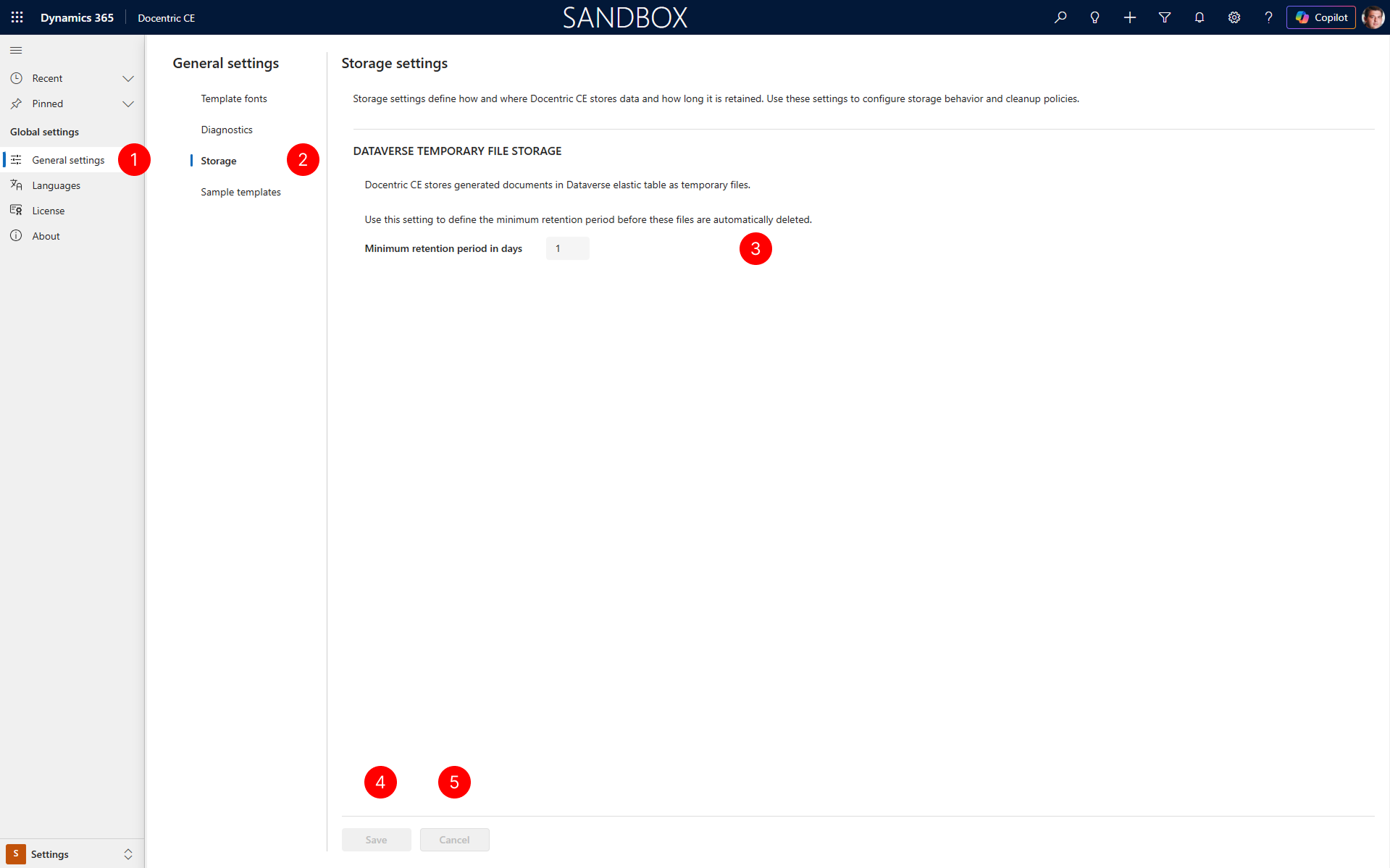
In the site map of Settings area, select General settings.
Under General settings, select the Storage tab.
In the Storage tab, locate the DATAVERSE TEMPORARY FILE STORAGE section. In the Minimum retention period in days field, enter the number of days you want to keep files in the temporary files table.
NOTE
The default Minimum retention period in days value is 1 day.
After making any changes to storage settings, select the Save button to activate your changes.
To discard any unsaved changes, select the Cancel button.
NOTE
Files older than the retention time you specify will be automatically removed from the temporary files table to free up storage space.
Next steps
Configure diagnostic settings — Learn how to control diagnostic data collection.