Configure document generation
After you select a Document template and Language in the first step of the Document Run dialog, the document generation step allows you to configure how your document will be generated. In this step you can choose the output format (Word or PDF) and specify a file name for the generated document before proceeding to delivery options.
Prerequisites
- You have one of the following Docentric CE security roles assigned:
- Docentric CE User or
- Docentric CE Maker or
- Docentric CE Administrator
- You have completed the Select templates and files step and selected Next
Configure generation settings
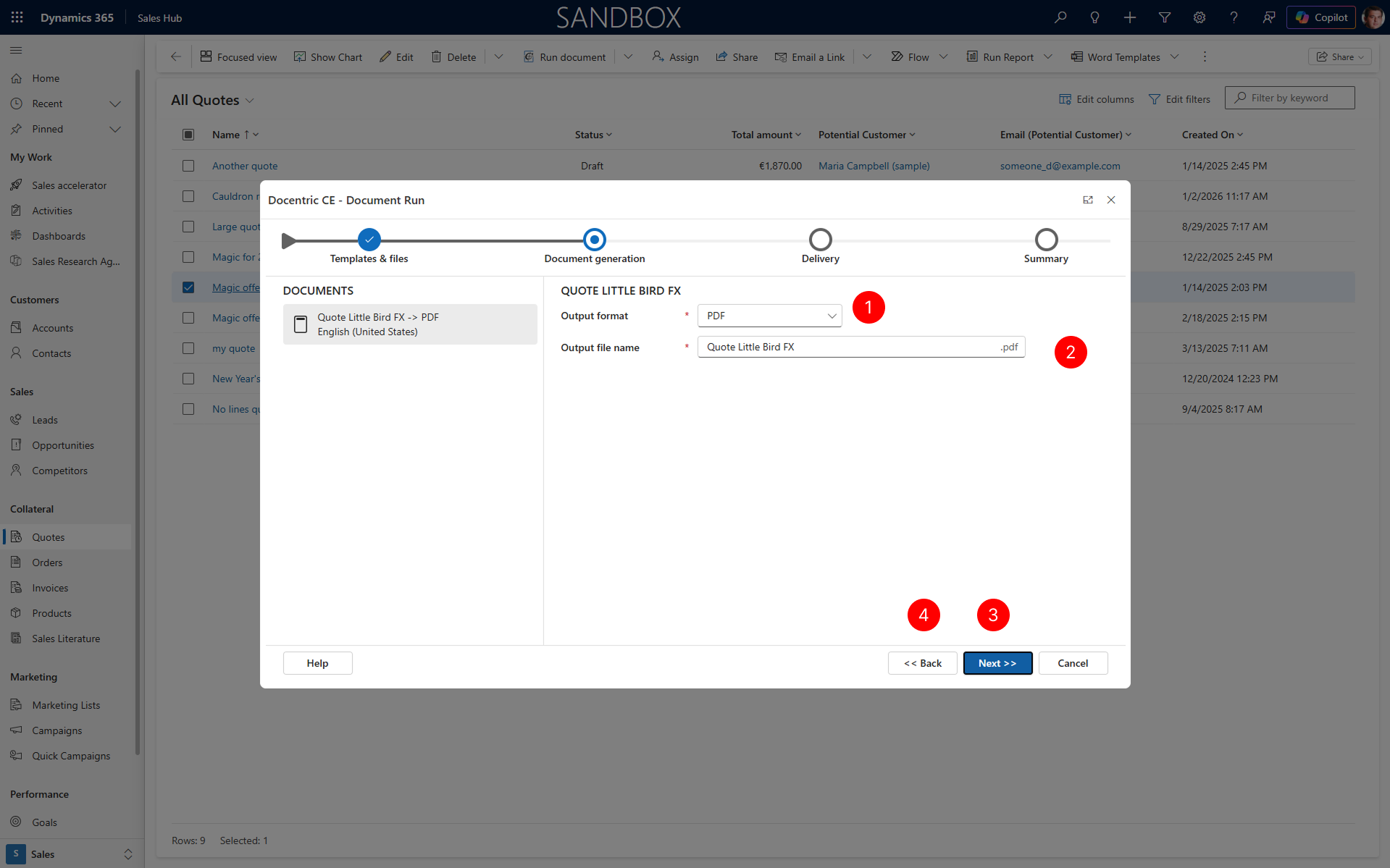
The Document generation step displays your selection in the DOCUMENTS panel on the left, showing which document will be generated.
In the right panel, select your preferred format from the Output format dropdown. Choose either Word or PDF depending on your requirements.
In the Output file name field, enter the file name for your generated document.
TIP
Do not include the file extension; Docentric CE will add it automatically based on your format selection.
Choose Next to proceed to the Delivery step.
If you need to modify your template or language selection, choose Back to return to the Select templates and files step.
Next steps
Delivery - Learn how to specify where your generated document should be sent.