Configure sample templates
Sample templates are pre-built Document Templates that demonstrate Docentric CE features and best practices. These templates help you understand how to design templates for common business scenarios and provide a starting point for creating your own templates.
Configuring sample templates is an optional step you can take while evaluating or learning how to use Docentric CE features.
Prerequisites
- You have the Docentric CE Administrator security role assigned.
- You have opened Settings area of Docentric CE application
Install or uninstall sample templates
Installing sample templates adds pre-configured Document Setups, Data Models, and templates to your environment that you can use as examples or customize for your needs.
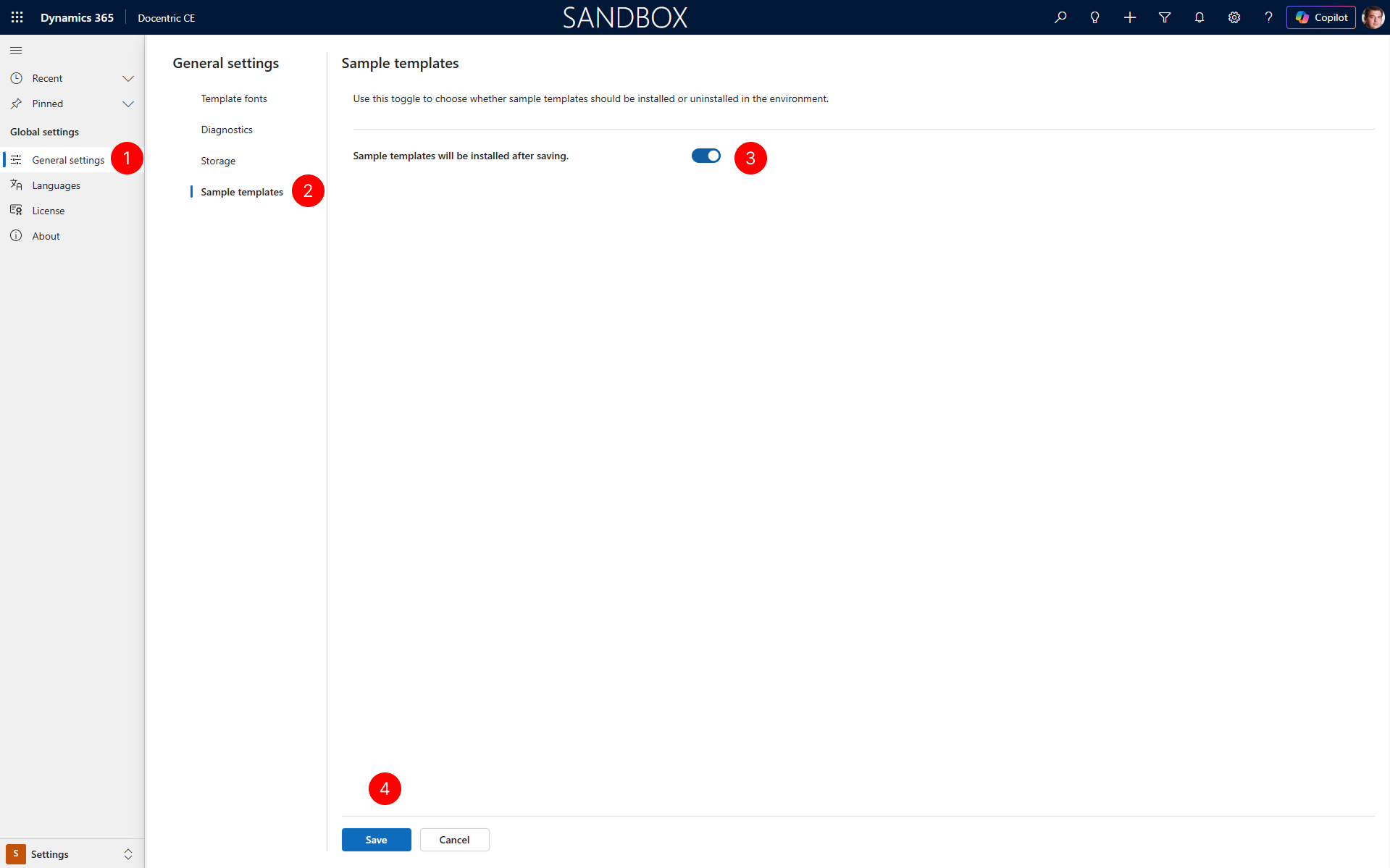
In the site map of Settings area, select General settings.
Under General settings, select the Sample templates tab.
On the Sample templates tab, toggle the Sample templates will be install setting on (or off) for sample templates to be installed (or uninstalled).
Select Save to begin the installation process. Wait for the installation to complete. The system will install all sample Document Setups, templates, and related configurations.
NOTE
Installing sample templates will add new Document Setups configurations to your environment. All created configurations are suffixed with
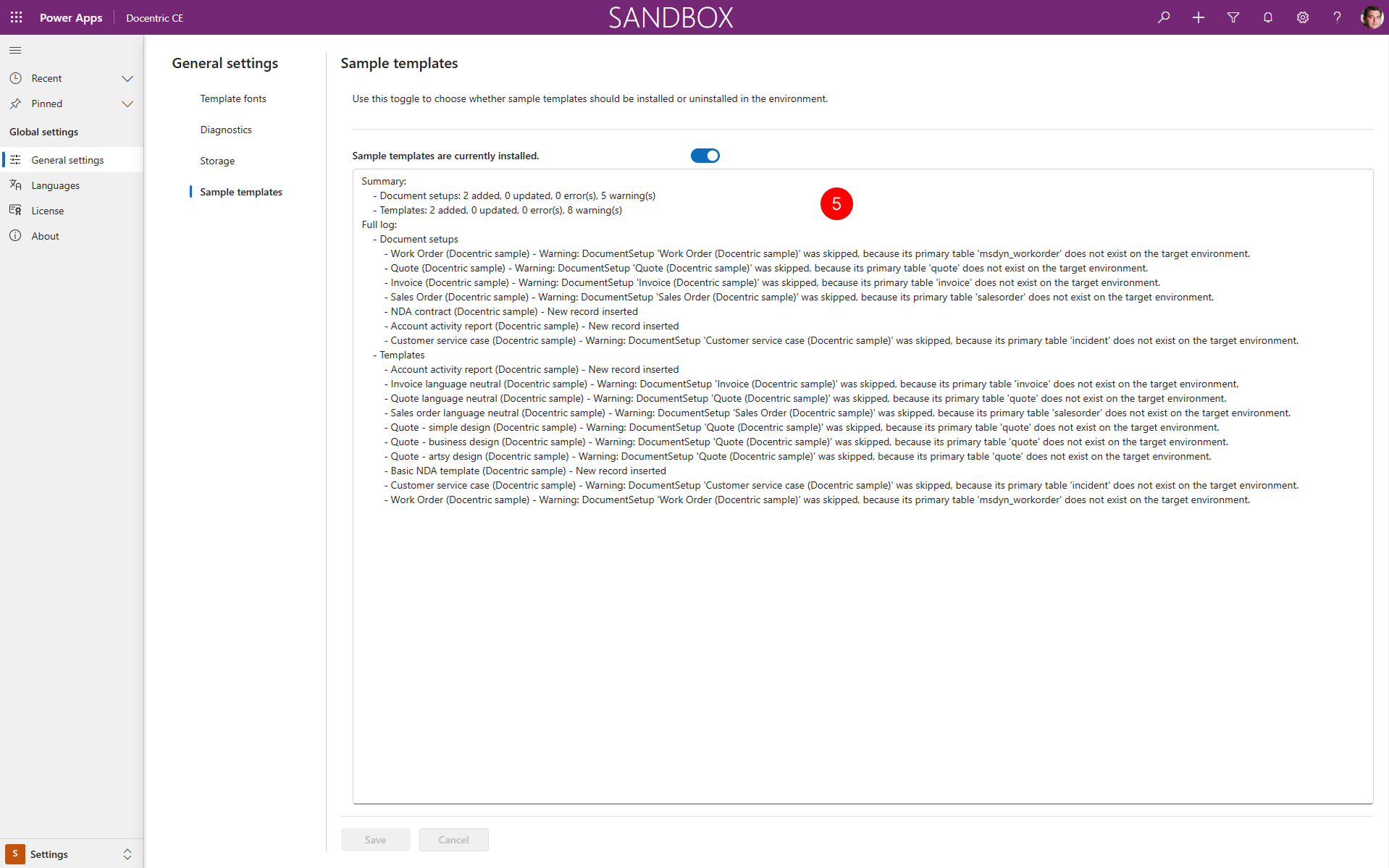
(Sample). Which sample templates get installed, depends on which Dynamics 365 apps you have installed in your environment. For example, if you only have Dynamics 365 Sales installed, sample templates for Dynamics 365 field service will not be installed. Uninstalling sample templates will permanently remove all sample Document Setups, templates, and related data from your environment. This action cannot be undone.
 5. After installation of templates, review the summary and detailed log to see which sample templates are installed.
Available sample templates
The following sample templates ship with Docentric CE. Which templates get installed depends on which Dynamics 365 apps are available in your environment.
Sample templates that work across any app
These templates use the Account table, which is available in Dynamics 365 Sales, Customer Service, and Field Service.
| Document Setup | Template | Primary table | Description |
|---|---|---|---|
| NDA contract (sample) | Basic NDA template (sample) | account | A simple NDA contract identifying the disclosing and receiving parties (name and address) and the effective date. Generate it in Word to edit the purpose and term before printing and signing. |
| Account activity report (sample) | Account activity report (sample) | account | An account overview combining key facts (industry, status, size, revenue), relationship context, and a pipeline snapshot. Lists open opportunities and an activities and notes timeline to support account reviews. |
Sample templates for Dynamics 365 Sales
These templates cover common sales documents. Quote, Invoice, and Sales Order templates also work in Dynamics 365 Field Service where those entities are available.
| Document Setup | Template | Primary table | Description |
|---|---|---|---|
| Quote (sample) | Quote language neutral (sample) | quote | A language-neutral quote with reference number, validity date, billing details, payment terms, and a line-item table. Includes a full totals breakdown and sender contact details. |
| Quote (sample) | Quote - simple design (sample) | quote | A minimal quote with reference, date, expiry, payment terms, currency, billing address, and item lines. Ends with a compact summary of discount, freight, taxes, and total due. |
| Quote (sample) | Quote - business design (sample) | quote | A structured quote with customer details, payment terms, a formal line-item table, and a totals summary including discount, tax, freight, and grand total. Features a company header and issuer contact. |
| Quote (sample) | Quote - artsy design (sample) | quote | A visually styled quote with reference, validity, bill-to details, and item lines showing product name, unit price, quantity, and amount. Highlights a totals area with subtotal, discount, freight, taxes, and final total. |
| Invoice (sample) | Invoice language neutral (sample) | invoice | A language-neutral invoice with reference number, due date, bill-to details, payment terms, and item lines. Includes totals for subtotal, tax, discount, freight, and amount payable, plus sender contact details. |
| Sales Order (sample) | Sales order language neutral (sample) | salesorder | A language-neutral sales order confirmation with order reference, fulfillment date, billing details, payment terms, and ordered line items. Summarizes subtotal, discount, tax, freight, and total, with issuer contact details. |
Sample templates for Dynamics 365 Customer Service
| Document Setup | Template | Primary table | Description |
|---|---|---|---|
| Customer service case (sample) | Customer service case (sample) | incident | A printable case summary with case reference, title, status, classification, customer and contact details, and a case description. Includes owner, response and resolution targets, and an activity and notes timeline. |
Sample templates for Dynamics 365 Field Service
| Document Setup | Template | Primary table | Description |
|---|---|---|---|
| Work Order (sample) | Work Order (sample) | msdyn_workorder | Prints a work order with customer and service location, status, asset details, reported issue, and technician instructions. Covers planned work: materials, tasks, services, and bookings with scheduled time and duration. |
Next steps
Explore Document Setups — Learn about Document Setups and how to configure them for your business needs.