Document Setup Overview
A Document Setup is a collection of settings and components needed to generate and distribute documents in Docentric CE for a specific Dataverse entity (table) — such as a Quote, Invoice, or Contract. A single Document Setup specifies the following main parts:
- Data Model — Specifies which data from your Dataverse tables will be available for document generation
- Document Templates — The pre-designed Word document templates that define the layout and structure of generated documents
You can create multiple Document Setups for the same entity type, each having its own configuration of Data Model and Document Templates.
How Document Setups work
When a business user runs a document from within a Dynamics 365 or Power Platform application, they select a record (such as a specific Quote) and a Document Setup. Docentric CE uses the Document Setup configuration for that entity type to:
- Load the data from the Dataverse record and related tables (as defined by the Data Model)
- Merge the data into a Document Template, replacing all tagging elements with actual values
Key components of a Document Setup
Data Model
A Data Model defines the source and structure of the data available for document generation. A Data Model has a hierarchical data structure consisting of data records and fields that represent tables and columns from your Dataverse environment.
The data structure always starts with a root record representing the primary table (e.g., Quote) for which a Document Setup is being configured. Each record type can contain data fields that represent child records representing related table, for example, Quote record has a field named Lines that represents related QuoteLine records for a particular Quote root record.
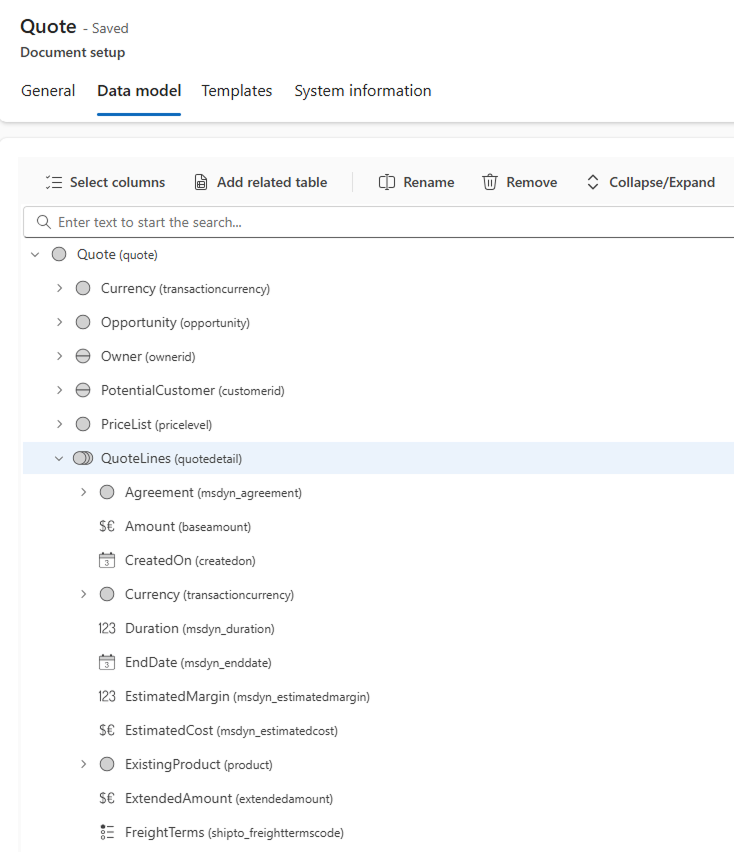
You can use the Data model tab to create and customize a Data Model for a Document Setup. The data structure is built by adding or removing Dataverse fields and related tables.
For details, see Set up Data Model.
Document Templates
Document Templates are pre-designed documents created in Microsoft Word that contain tagging elements—special placeholders that indicate where data from your Data model should be inserted, how it will be displayed and formatted. During document generation, these placeholders are replaced with actual data values to create the final document.
For details, see Set up Templates.
Next Steps
- Configure Document Setup — Create and configure a new Document setup
- Set up Data Model — Define the data available for document generation
- Set up Templates — Design and configure document templates