Image tagging element
Use the Image tagging element to dynamically insert images into your generated documents. Image tagging elements act as placeholders for image data fields and allow you to control how images are scaled and positioned when rendered in the generated document.
Prerequisites
- Template Designer installed. For more information, see Install Docentric Designer.
- A document template set up with a Data Source Package (DDSP) loaded. For more information, see Set up a document template.
- An Image tagging element inserted in your template. For more information, see Tagging elements overview.
- An Elements tree pane shown. For more information, see Elements tree pane
Bind Image tagging element to data
Before you can configure image sizing, bind the Image tagging element to a binary data field containing image data. For detailed steps, see Bind tagging element to data.
Configure Size Mode
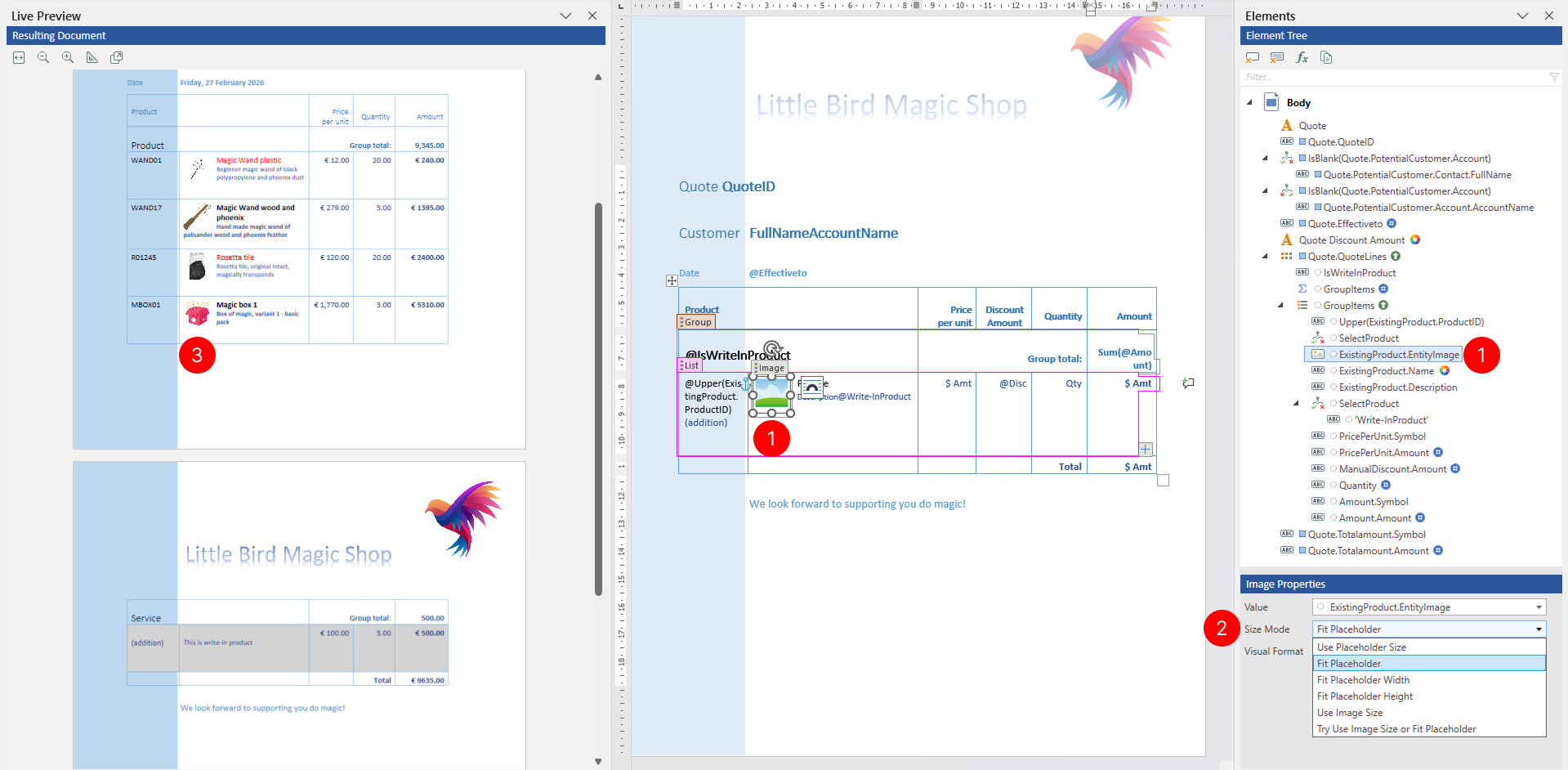
By selecting the Size Mode, you can control how the image is scaled and positioned when rendered in the generated document.
- Select the Image tagging element to view its properties.
- In the Properties pane, locate the Size Mode property. Select one of the following options from the dropdown:
- Use placeholder size - Forces the image to exactly match the placeholder dimensions, ignoring the original image aspect ratio
- Fit placeholder - Scales the image to fit within the placeholder while maintaining the original aspect ratio
- Fit placeholder width - Scales the image to match the placeholder width while maintaining the original aspect ratio (height adjusts automatically)
- Fit placeholder height - Scales the image to match the placeholder height while maintaining the original aspect ratio (width adjusts automatically)
- Use image size - Displays the image at its original dimensions, ignoring the placeholder size
- Try use image size or fit placeholder - Attempts to use the original image size, but scales down to fit the placeholder if the image is larger than the placeholder
- Review results in Live Preview pane.
Apply visual formatting
You can specify visual formatting rules on the Image tagging element to control the visual appearance of text within the Image tagging element in a dynamic, data-driven manner. For detailed steps, see Apply visual formatting to tagging elements.